
Wristband play call cards
Wristband Play Call Cards for Baseball & Softball
A wristband play call card is a small, printable grid that lets coaches and catchers call pitches or offensive plays by row-and-column lookup instead of hand signs. Pitch MetRx includes a Wristband Cards Generator so you can build a randomized pitching or offensive card, export a print-ready PDF with a matching Coach’s Reference Sheet, and keep that workflow connected to live charting—included with every plan, not sold as an add-on. Start a 14-day free trial or book a demo to build your first card today.
What a wristband pitch-calling card does
During a game, the coach or catcher needs a fast, discreet way to communicate the next pitch or offensive play. A wristband pitch-calling card replaces visible hand signs with a row-and-column or short-code lookup on a grid worn inside a wristband sleeve. The pitch caller says a coordinate or code; the catcher or base coach finds that cell on the card and executes the call.
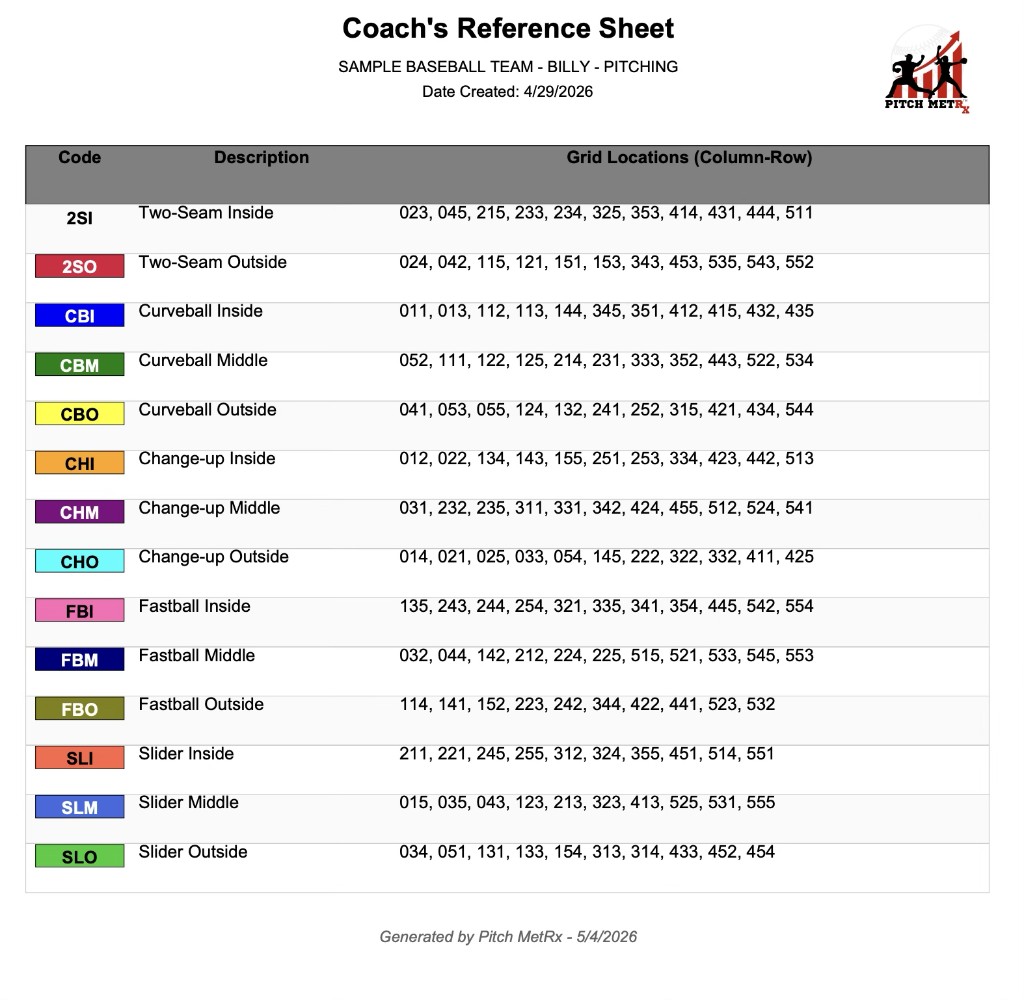
That only works when everyone shares the same key. The Coach’s Reference Sheet lists every code, its description, and where it sits on the grid so the dugout and the battery stay aligned. In baseball, you might label pitch types as fastball inside, curveball away, or slider down. In softball, the same grid system applies but pitch names differ—rise ball, drop ball, change-up, screwball—and offensive terminology may emphasize slapping, bunting, and small-ball plays. The lookup mechanic is the same; the code list reflects your sport and your staff’s vocabulary.
Many programs start with paper templates or free downloads, then outgrow them when they need new grid layouts, color coding, or a fresh shuffle between series. Pitch MetRx is built for coaches who want a connected call system—from printable card to game-ready lookup to post-game review—without maintaining a separate design file every time the arsenal changes.
Choose your card system
Not every team needs the same wristband setup. Start by deciding whether you are calling pitches for the battery or plays for your offense, then choose how much complexity your players can handle under game pressure.
Pitching cards for the battery
Pitching wristband cards assign short codes (up to 5 characters) to each pitch type in your arsenal. In Pitch MetRx, switch to Pitching mode, select from built-in baseball or softball pitch lists, load types from a pitcher on your roster, or enter custom codes. Color-code each entry so the catcher can scan the grid quickly. Add an optional player name to the card banner when you build a card for a specific arm. The result is a randomized grid the battery can reference pitch after pitch without the opposing dugout reading your fingers.
Offensive play-call cards
Offensive wristband cards work the same way but list play calls instead of pitch types. Switch to Offense mode and select from built-in plays—hit away, sac bunt, squeeze, steal, hit & run, bunt & run, fake bunt, delayed steal, and more—or add custom offensive plays with codes up to 5 characters. Base coaches and third-base boxes use the same row-and-column lookup. Add your team name to the card banner so multiple cards stay identifiable in the dugout.
Simple color/number cards vs. randomized grids
Some teams use basic color or number cards where each hue or digit maps directly to one call. Others use a larger grid with shuffled positions so the relationship between a coordinate and a pitch type is harder for opponents to decode. Neither approach is universally better—the right choice depends on your players’ age, how many calls you need on the card, and how much sign-security you want. Randomization in Pitch MetRx is a sign-security aid; it makes patterns harder to pick up, but it does not guarantee opponents cannot steal signs.
| Factor | Simple color/number cards | Randomized grid cards |
|---|---|---|
| Age & experience | Younger teams or newer catchers who need the fewest lookup steps | Older players comfortable finding a cell by row and column under pressure |
| Number of calls | Small repertoires—a handful of pitch types or offensive plays | Larger arsenals that need 3×3 through 6×6 grids (9 to 36 cells) |
| Sign-stealing resistance | Lower—direct color or number mappings are easier to observe and remember | Higher—shuffled grid positions add a layer of concealment (still not a guarantee) |
How to make a softball pitch-calling chart
Softball coaches often search for a pitch-calling chart they can print before the first conference game. The same workflow applies to baseball—only the pitch-type list and offensive vocabulary change. Pitch MetRx walks you through building a chart inside the app (a Pitch MetRx account is required; there is no anonymous free download).
- Choose Pitching or Offense mode Open the Wristband Cards Generator from your Pitch MetRx dashboard and select whether you are building a pitch-calling card for the battery or an offensive play card for your base coaches.
- Add your codes For pitching: pick from built-in softball or baseball pitch types, load types from a pitcher on your roster, or enter custom codes up to 5 characters. For offense: check built-in plays (hit away, sac bunt, squeeze, steal, and more) or add custom plays.
- Choose grid size Select 3×3, 4×4, 5×5, or 6×6. Rows and columns are numbered so every cell has a coordinate on the Coach’s Reference Sheet.
- Set colors Assign a highlight color to each pitch type or offensive play so callers can scan the grid quickly in the dugout or behind the plate.
- Shuffle the layout Generate a new card. Codes distribute evenly across the grid and shuffle into randomized positions.
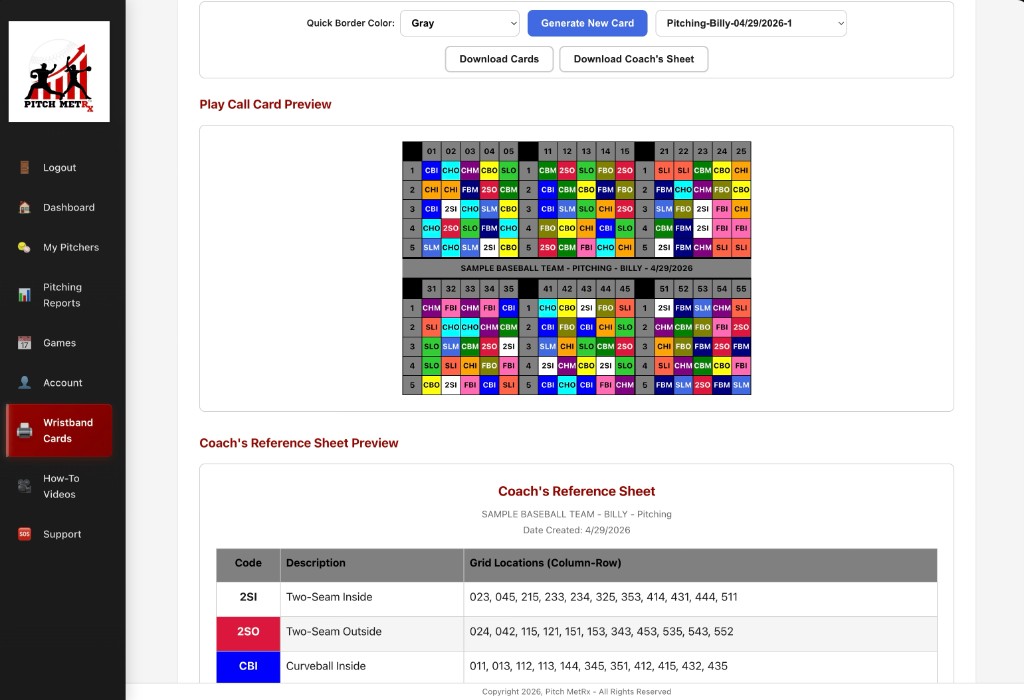
- Preview on screen Review the grid and reference sheet before you commit ink and laminate.
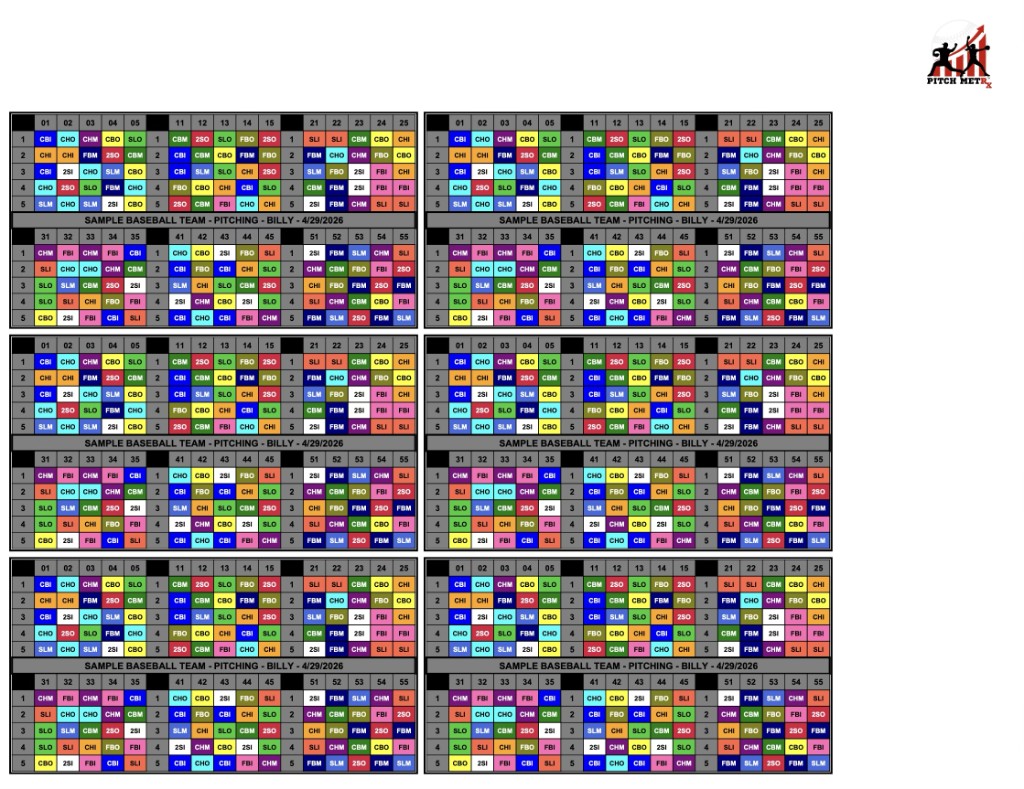
- Export the card and Coach’s Reference Sheet Download a print-ready PDF with a 2.5″ × 4.5″ card on letter paper plus the matching coach key.
- Print, cut, and insert Print the PDF, cut along the card outline, and slide it into your wristband sleeve. Keep the Coach’s Reference Sheet in the dugout or clipboard.
Need a full walkthrough of live charting alongside your card? See our softball pitch charting and baseball pitch charting guides, or start from the pitch charting app overview.
How to use it on game day
A wristband card only helps when your staff agrees on who calls, how they communicate, and what happens when something goes wrong.
Who calls. On most teams the head coach, pitching coach, or catcher drives pitch selection. Offensive cards usually live with the third-base coach or a designated base-coach caller. Decide before first pitch so there is no hesitation with runners on base.
Coordinate communication. Agree on whether you call by row-and-column (“3-2”) or by short code (“FBI”). Walk through a few sequences in practice so the catcher or base coach can find cells without staring at the band. The Coach’s Reference Sheet stays in the dugout for the caller; the card on the wrist is for the player who executes.
Lookup under pressure. Color coding helps, but reps matter. Run intrasquad situations where the only input is the wristband coordinate—no verbal pitch name—so muscle memory kicks in before league play.
Change versions between opponents or series. When you add a new pitch or play, regenerate and shuffle. Pitch MetRx makes it straightforward to export a fresh card and matching key without rebuilding a spreadsheet from scratch.
Lost or unreadable card. Keep a backup print in the dugout and a photo of the grid on a trusted staff phone (if your program allows phones in the dugout). If the card smears or tears, swap it between innings rather than guessing coordinates from memory.
What to print and pack
Game day is smoother when your wristband kit is assembled before you leave for the field. Here is a practical checklist built around the Pitch MetRx PDF export.
- Wristband card — 2.5″ × 4.5″ cutout from the exported PDF, sized for a standard sleeve.
- Coach’s Reference Sheet — matching key with every code, description, and grid coordinate.
- Backup copy — second print of the card and reference sheet in case of rain, sweat, or a torn sleeve.
- Lineup context — if you use lineups in Pitch MetRx, having today’s order nearby helps the caller connect situational plays to the right batter.
- Pen, sleeve, lamination — a fine-tip pen for marking notes on the reference sheet; a rigid sleeve so the card does not fold; optional lamination for multi-game durability.
Pitch MetRx exports a formatted PDF—not a generic blank template—so what you print is the exact grid you previewed in the app. You need an account to generate and export; the 14-day free trial is enough to build, print, and test a card before you subscribe ($15/mo or $99/yr).
Why connect call cards to pitch charting
Printing a card solves today’s lineup. Connecting that card to how you chart the game solves tomorrow’s development plan. When the code on the wristband matches the pitch type you log in the app, you can review call intent → pitch type and location → outcome as one chain instead of guessing what was signaled from the bleachers.
That linkage powers the metrics coaches actually use between innings: WHIFF% by pitch type, BAA by count, and location splits that show whether your rise away is earning swings in 1-1 counts. Pitch metrics update automatically as you chart, and Pitch Call Analysis breaks results down by the calls you made—not just what crossed the plate.
Pitch MetRx keeps wristband generation inside the same platform as the pitch charting app and pitch tracking app, so you are not maintaining one tool for printable cards and another for game data. Signal “CBM” on the band, tap the matching pitch type in the dugout, log the outcome, and your post-game report reflects the decision—not a chartist’s best guess.
See in action
Screenshots below show the Wristband Cards Generator and sample pitching cards. Offensive play cards use the same generator, grid sizes, shuffle, PDF export, and Coach’s Reference Sheet workflow.
FAQs
How do softball wristband signs and pitch-calling cards work?
A softball wristband pitch-calling card is a small grid worn on the catcher’s or pitch-caller’s wrist. Each cell shows a short code for a pitch type or offensive play. The coach or catcher calls out a row-and-column coordinate (or a short code), and the battery looks up that cell on the card to see the intended call—without visible hand signs. A matching Coach’s Reference Sheet lists every code, its description, and where it appears on the grid.
What should go on a pitching wristband card versus an offensive play card?
A pitching wristband card lists pitch-type codes (up to 5 characters) for your battery—fastballs, breaking balls, off-speed, rise balls, drops, and more. Load types from a pitcher on your roster or add custom codes, and color-code each entry for quick scanning. An offensive play card lists play-call codes such as hit away, sac bunt, squeeze, steal, hit & run, bunt & run, and fake bunt—or custom plays you define. Pitch MetRx lets you build either card type in the same Wristband Cards Generator by switching between Pitching and Offense mode.
How do you randomize cards and give the coach/catcher a matching key?
In Pitch MetRx, add your codes, choose a grid size, set colors, and generate a new card. The generator distributes codes evenly across the grid and shuffles them into randomized positions. Every export includes a Coach’s Reference Sheet that lists each code, its description, and the row-and-column coordinates where it appears—so the coach and catcher share the same key. Randomization is a sign-security aid that makes patterns harder to decode; it is not a guarantee against sign stealing.
What grid size and code length make calls fast enough in a live game?
Pitch MetRx supports grid sizes of 3×3, 4×4, 5×5, and 6×6, with codes up to 5 characters. Smaller grids work well for younger teams or smaller pitch arsenals where fewer cells mean faster lookups. Larger grids fit more pitch types or offensive plays but require more scanning under pressure. Short, memorable codes (two to four characters) are usually easier to call and find than longer ones. There is no single best size—match grid and code length to your team’s age, experience, and number of calls.
Can the same generator work for baseball and softball?
Yes. The Wristband Cards Generator includes built-in pitch type lists for both baseball and softball, plus built-in offensive plays that work for either sport. You can load pitch types from a pitcher on your roster or enter custom codes. The same PDF export workflow—2.5″ × 4.5″ card on letter paper plus a Coach’s Reference Sheet—applies to pitching and offensive cards in both sports.
How do you print and fit a card into a wristband?
After generating a card in Pitch MetRx, export the PDF. The export is formatted for a 2.5″ × 4.5″ wristband card on letter-size paper, with the Coach’s Reference Sheet included. Print the PDF, cut along the card outline, and slide the card into your wristband sleeve. Lamination or a protective sleeve can help the card survive a full game in heat and humidity.
Is a printable generator enough, or is an integrated charting workflow useful?
A printable generator solves the immediate need: a card and matching coach key for game day. An integrated workflow adds value when you connect call intent to pitch charting—logging the pitch type, location, and outcome that matches the wristband code. That lets you review WHIFF%, BAA, and count-location results by the calls you actually made, not just aggregate game stats. Pitch MetRx includes the Wristband Cards Generator alongside live pitch charting and game reports in one platform.
How much does the wristband card generator cost?
The Wristband Cards Generator is included with every Pitch MetRx subscription—not sold as a separate add-on. Pitch MetRx offers a 14-day free trial, then $15/mo or $99/yr.
From printable card to game-ready call system
Build a randomized pitching or offensive wristband card, print the matching Coach’s Reference Sheet, and chart the game in the same app. Included with every plan.
Start 14-Day Free Trial