
Pitch tracking app
Pitch Tracking App for Baseball & Softball Coaches
Pitch MetRx is live charting for high school and travel coaches, not a radar gun or a spin-rate device. You log pitch type, location, count, and outcome from the dugout on a phone or tablet—no hardware on the field, no sensor behind the plate.
If you already have a radar reading, you can type MPH in by hand. The app still does not measure velocity or spin. Start a 14-day free trial or book a demo to chart your next game.
What is a pitch tracking app?
A pitch tracking app records every pitch in a live game and stores the details coaches need to make adjustments between innings and development plans after the weekend. At minimum, a useful tracker captures five fields on every pitch:
- Pitch type — fastball, curveball, change-up, rise ball, drop, or whatever is in your pitcher’s arsenal
- Zone or location — where the pitch was intended or where it crossed the plate
- Count — balls and strikes before the pitch
- Outcome — called strike, swing-and-miss, foul, ball in play, ball four, and contact quality when relevant
- Batter hand — right-handed or left-handed hitter
Velocity is optional. Pitch MetRx does not require a radar gun or sensor hardware. If your staff has a radar reading, you can manually enter pitch velocity (MPH) as you log each pitch. Manual dugout tracking records what the coach or chartist observes—it does not measure spin rate, release point, or movement profiles the way dedicated sensor systems do.
The payoff is not the log itself. It is the report that log produces: which pitch-location combinations are earning whiffs, which counts are producing hard contact, and whether your first-pitch approach is setting up the at-bat.
Pitch tracking vs. pitch charting vs. pitch counters
Coaches use these terms interchangeably in the dugout, but they describe different jobs. Knowing the distinction helps you pick the right tool—and avoid paying for hardware you do not need on game day.
Tracking = live capture
Pitch tracking is input during the game. Someone in the pitch-calling loop logs each pitch as it happens—type, location, count, outcome, batter hand—so nothing is reconstructed from memory after the final out. The failure mode is incomplete or inaccurate logs: missed pitches, wrong labels, or a chartist who was not part of the calling conversation.
| Workflow | What it records | When data is entered | Decisions it enables |
|---|---|---|---|
| Pitch tracking | Type, zone, count, outcome, batter hand; optional MPH | Live, pitch by pitch during the game | Between-inning pitch calling, real-time sequencing adjustments |
| Pitch charting | Organized pitch record with splits and trends | Built automatically as you track; reviewed mid-game or post-game | Development plans, count-level analysis, season comparisons |
| Pitch counter | Running pitch total, balls and strikes | Live, minimal taps per pitch | Workload awareness, basic pace-of-game management |
Charting = organized record and analysis
Pitch charting is the organized output for coaching decisions—zone breakdowns, WHIFF% and BAA by pitch type, count splits, spray charts, and season-long trends. Paper charts, spreadsheet exports, and post-game PDF reports are all charting outputs. The failure mode is beautiful reports built on unreliable input, or no logging habit at all.
In Pitch MetRx, tracking and charting happen in one flow: you log live from the dugout and the chart updates automatically. Read our Coach’s Corner article on pitch charting vs. pitch tracking or explore the full pitch charting app feature set.
A counter may be enough when…
A simple pitch counter serves a real need: tracking total pitches for workload management, monitoring pitch pace, or keeping a basic balls-and-strikes tally when no one is assigned to full charting duty. That is a valid choice for a bullpen day, a scrimmage where you are focused on mechanics, or a program that is not ready to log type and location on every pitch.
A counter is not enough when you need to answer coaching questions like “Is our change-up away working at 1-1 against lefties?” or “Should we lead with the rise ball at 0-0?” Those questions require type, location, count, outcome, and batter-hand context—the fields a pitch tracking app captures.
How live pitch tracking works in Pitch MetRx
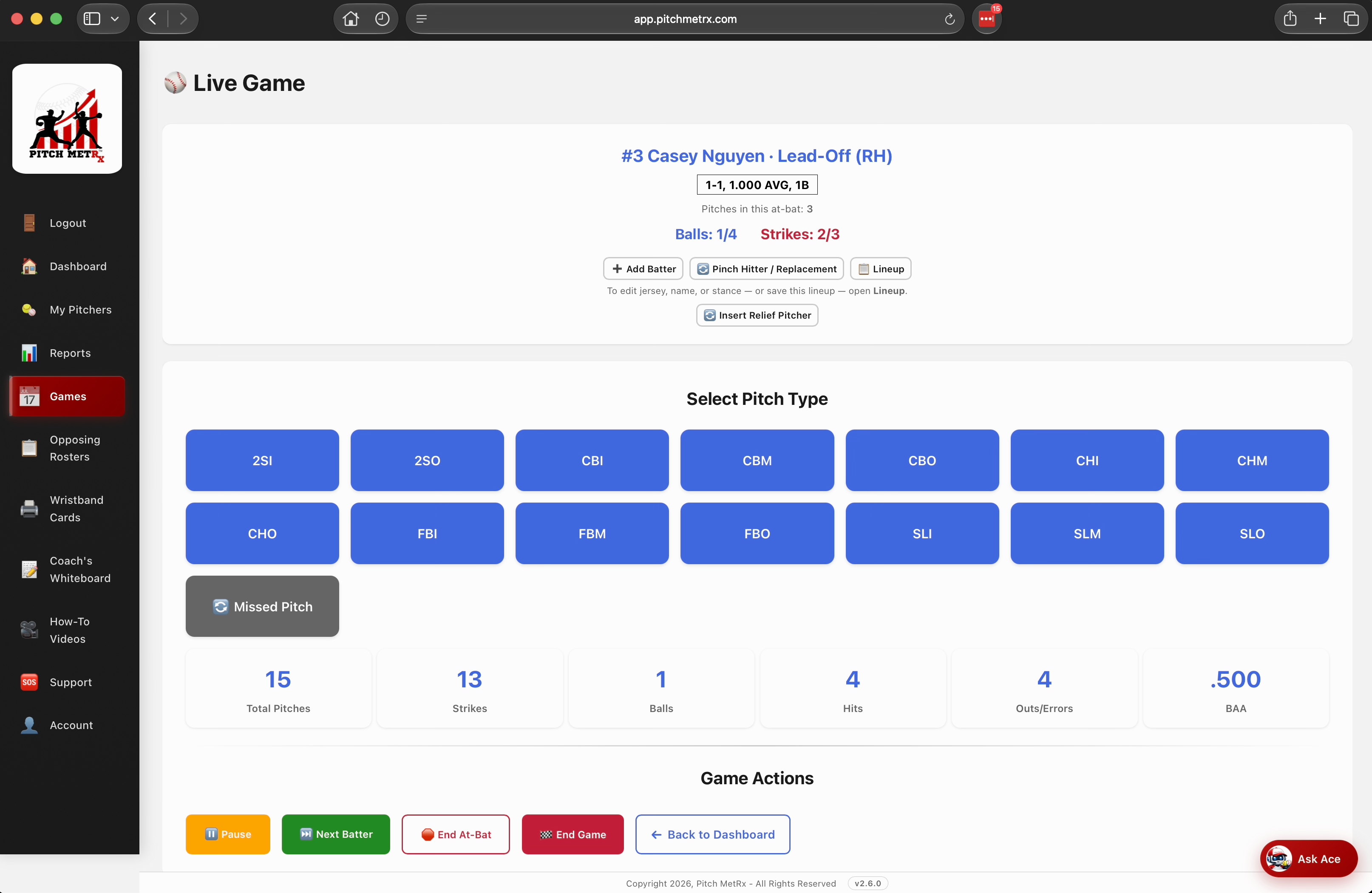
Pitch MetRx is a web app you open on any phone, tablet, or laptop—no separate app store download required. Add it to your home screen for one-tap dugout access. Here is the live tracking workflow from first pitch to post-game export.
- Create your account Start a 14-day free trial or sign in to your existing subscription.
- Set up your roster and pitch types Add pitchers and define the pitch types each arm throws—baseball fastballs and breaking balls, or softball rise balls, drops, and change-ups.
- Start a pitcher and game Select the pitcher on the mound and open a new game from your dashboard.
- Enter the batter and hand Log the batter (optionally from an opposing roster or live lineup) and confirm right- or left-handed.
- Log the pitch call and location Tap pitch type and zone before or as the pitch is delivered. Optionally enter velocity (MPH) if your staff uses a radar gun.
- Record the outcome Mark the result—called strike, whiff, foul, ball in play, ball four—and contact quality when the ball is put in play.
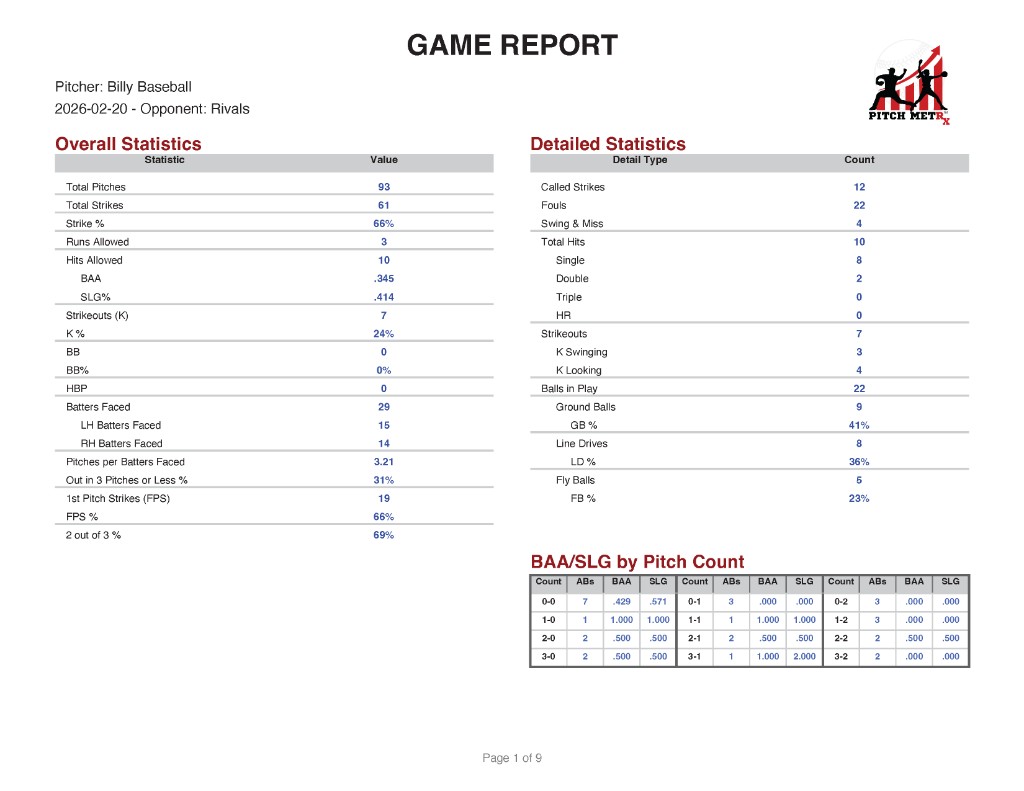
- Review between innings Pull a mid-game report to see WHIFF%, BAA, and Pitch Call Analysis for what is working right now.
- Export and share After the final out, download PDF or Excel reports, read the AI game summary, and add the outing to lifetime stats.
What coaches can learn from tracked pitches
Raw pitch counts tell you volume. Tracked pitches tell you what is working—and where to adjust before the lineup comes back around.
Pitch type and location effectiveness
See which offerings earn swings-and-misses, called strikes, and weak contact by zone. WHIFF%, BAA, SLG%, Freeze%, and Outs% update as you log, so you know whether the curveball away is winning at 1-1 or getting hit hard middle-in. Pitch metrics break down effectiveness by type and location without rebuilding spreadsheets after the game.
Count and batter-hand splits
The same pitch type performs differently at 0-0, 1-2, and 3-1—and against right-handed versus left-handed hitters. First-pitch strike % shows whether your opening pitch is setting up the at-bat. Pitch Call Analysis splits results by count so you can evaluate sequencing decisions, not just aggregate game lines.
Contact and spray outcomes
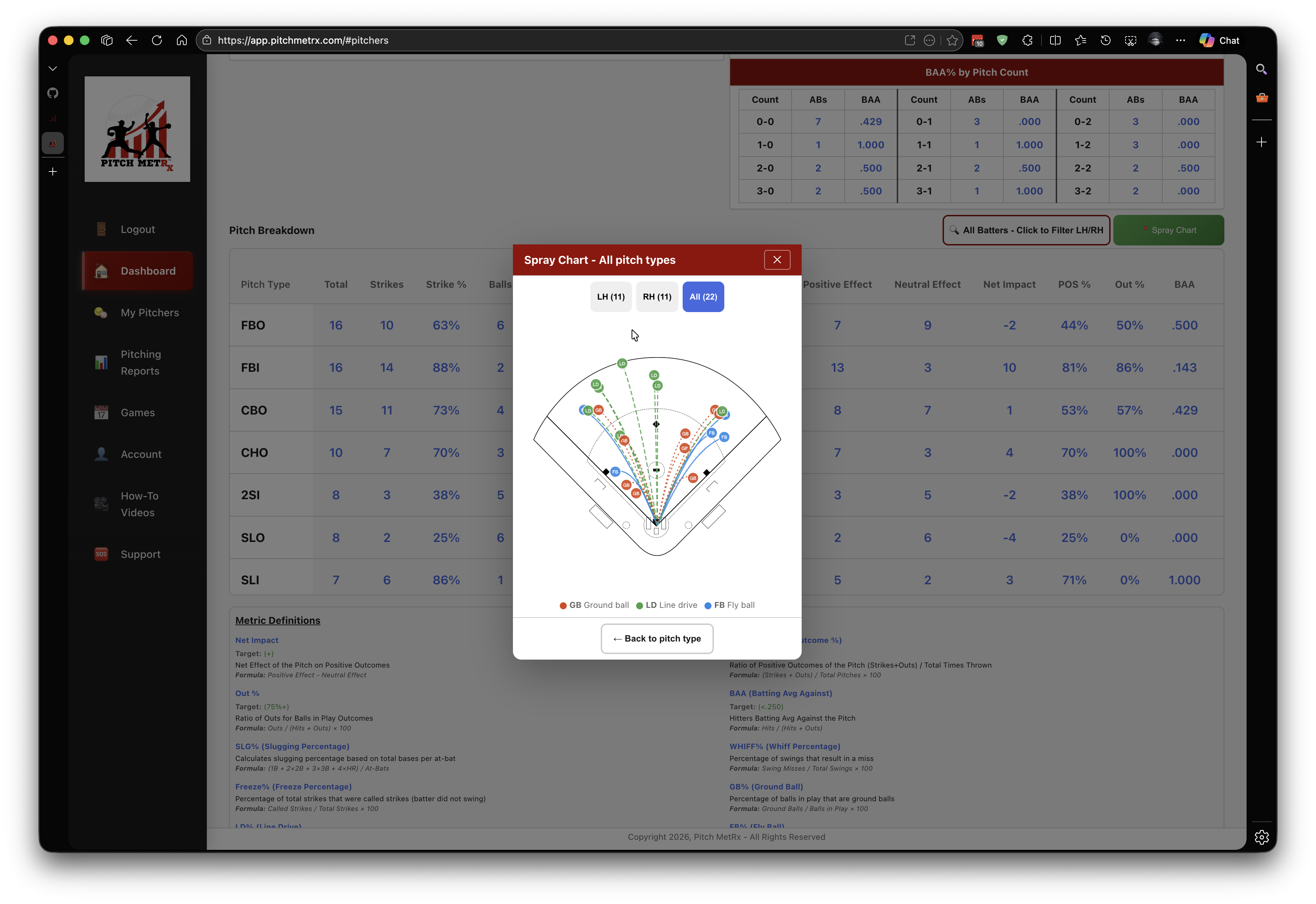
When the ball is put in play, tracked data shows direction, contact type, and result. Spray charts reveal whether your down-and-away approach is producing grounders and outs or getting pulled for extra-base hits. That context matters for defensive positioning and pitch-calling adjustments in the same game.
Season development and lifetime trends
Every tracked game feeds lifetime stats across the season. Compare WHIFF% and BAA month over month, review trends across a full rotation, and walk into development meetings with consistent data instead of memory. Post-game PDF and Excel export make it easy to share reports with pitchers, parents, or staff.
Baseball and softball workflows
One pitch tracking app covers both sports. Set up sport-specific pitch types, track games live, and get the same reports whether you coach travel ball, high school, or college.
Baseball pitch tracking
Track four-seam and two-seam fastballs, curveballs, sliders, change-ups, and cutters. See WHIFF% and BAA by count and location for every arm in your rotation.
Baseball pitch charting →Softball pitch tracking
Log rise balls, drops, change-ups, curves, and screwballs. Same instant reports, spray charts, and wristband play call cards softball coaches need on game day.
Softball pitch charting →Pitch types reflect each sport’s arsenal—baseball emphasizes fastball/breaking-ball/off-speed combinations; softball adds movement pitches like rise and drop. The tracking workflow, reports, and exports are identical.
Do you need radar or hardware?
No—not for manual dugout pitch tracking. Pitch MetRx works without radar guns, cameras, or sensor installations. You log each pitch from the dugout on your phone, tablet, or laptop and get game-impacting stats tied to live competition.
If your program uses a radar gun, velocity is supported as an optional manual entry. Toggle on MPH tracking and type the reading as you chart each pitch. That is still dugout logging—not automated sensor measurement.
What manual tracking does not provide: spin rate, release point, horizontal and vertical break profiles, or other biomechanics data that dedicated hardware systems capture in bullpen or facility settings. Those tools serve a different development workflow. For game-day pitch calling and between-inning adjustments, most baseball and softball coaches need reliable type-location-count-outcome logs—not a sensor suite on every field.
Choosing a pitch tracking app checklist
Before you assign a charting volunteer or start a trial, run through these questions:
- Who logs pitches? The pitch caller or someone in that conversation—not a parent reconstructing from the bleachers.
- What fields does it capture? Type, zone, count, outcome, and batter hand at minimum. Velocity optional if you use a radar gun.
- When is data entered? Live during the game beats post-game memory or video reconstruction.
- What reports will you actually read? WHIFF%, BAA, first-pitch strike %, and count splits matter more than a pitch total with no context.
- Does it work on your device? Pitch MetRx runs in any modern browser on phone, tablet, or laptop—no app store download required.
- Does it cover your sport? Baseball and softball pitch types, spray charts, and exports in one platform.
- Will you track every game? Development data compounds only with consistency across the season.
- What else is included? Wristband play call cards are included with every plan. Coach’s Whiteboard is available with a paid subscription.
FAQs
What is a pitch tracking app?
A pitch tracking app records every pitch in a live game—pitch type, zone or location, count, outcome, and batter handedness—and turns that log into coaching reports. Pitch MetRx shows which pitch types and locations are getting swing-and-misses, weak contact, and outs so you can adjust between innings. Velocity (MPH) can be entered manually when a radar reading is available, but it is optional.
What is the difference between pitch tracking and pitch charting?
Pitch tracking emphasizes live capture during the game—logging each pitch as it happens. Pitch charting emphasizes the organized record and analysis you get back—reports, zone breakdowns, count splits, and season trends. Pitch MetRx does both in one flow. See our article on pitch charting vs. pitch tracking or the pitch charting app overview for more.
Is a pitch counter enough for my team?
A pitch counter works when you only need a running total—pitches thrown or basic balls-and-strikes for workload awareness. If you want to know which pitch types and locations are effective by count and batter hand, you need more than a counter. Pitch tracking captures the context that powers WHIFF%, BAA, spray charts, and Pitch Call Analysis.
Do I need a radar gun or other hardware?
No. Pitch MetRx works without radar, sensors, or integrated hardware. Log each pitch on your phone, tablet, or laptop from the dugout. Radar guns are optional—if your team uses one, toggle on manual velocity (MPH) entry as you chart. Pitch MetRx does not measure spin, release point, or movement profiles; that requires dedicated hardware.
Does Pitch MetRx work for both baseball and softball?
Yes. Add sport-specific pitch types for baseball or softball. Reports, spray charts, AI summaries, PDF and Excel export, lifetime stats, and wristband play call cards work the same for both sports.
Can I track pitches on my phone or tablet during a game?
Yes. Pitch MetRx is a web app built for the dugout on phones, tablets, and laptops. Add it to your home screen for one-tap access—no separate app store download required.
What reports and metrics does pitch tracking provide?
Pitch MetRx calculates WHIFF%, BAA, SLG%, first-pitch strike %, Freeze%, Outs%, pitch-type breakdowns by location, spray charts, AI game summaries, and lifetime stats. Export PDF or Excel reports post-game and review Pitch Call Analysis by count.
How much does Pitch MetRx cost?
Pitch MetRx offers a 14-day free trial, then $15/mo or $99/yr. Wristband play call cards are included at no extra cost. Coach’s Whiteboard is available with a paid subscription. See pricing for details.
Start tracking your next game
Log intent, location, count, outcome, and batter hand live from the dugout—then review the report that changes the next inning.
Start 14-Day Free Trial