
Bullpen
Chart the Target. See the Miss.
Bullpen is practice command, not a game. Draw the spot you wanted on the Target Map, tap where the pitch actually crossed, and Pitch MetRx keeps the intent and the result on the same chart. Session, lifetime, and custom reports name the miss tendency so a bullpen becomes a plan, not a pile of throws.
What the Target Map records
Open Bullpen from the sidebar, the Dashboard, or a pitcher’s page. Choose baseball or softball, pick RH or LH, choose a pitch type, then set the target. Inside and Away follow the batter, so a zone drawn Inside stays Inside when you switch stance or flip between Pitcher’s View and Catcher’s View. Reports stay in Pitcher’s View.
Drawn target
Drag a target on the map, resize it, or pick a named zone: High, Mid, or Low, and In, Mid, or Away. The target is saved for that pitch type and that batter stance. RH and LH targets stay separate.
Where it crossed
Tap the spot the pitch crossed, including a chase pitch off the plate, then press Confirm. The mark is the size of a baseball or a softball, matching the sport for that session.
Miss tendency
The report names the average miss: Up, Up-Away, Away, Down-Away, Down, Down-In, In, Up-In, or On-Target. When the misses do not cluster, it says Mixed.
Accuracy vs. strike %
Accuracy scores the pitch against the target you drew. Strike % scores it against the strike zone. A pitch can be a strike and still miss the spot you called.
Command or simulated plate appearance
Leave Simulated PA off for a command session. The live view shows total pitches and accuracy, and each pitch is Strike or Ball and On-Target or Miss. The report adds strike % and miss tendency. Turn Simulated PA on to run balls, strikes, walks, strikeouts, and K%, and to be asked for LH or RH between plate appearances.
Optional MPH
Turn on Log Pitch MPH and type the speed from a gun or other device. Skip any pitch. Pitch MetRx does not measure speed or spin. Reports then show Avg MPH and Max MPH.
Aim the pitch where it is supposed to finish
The target should match the pitch. A miss arrow is useful only when the intended spot was the right one.
Fastpitch rise and drop
A riseball’s target is the top third: High In, High Mid, or High Away, or an Up chase. A rise that finishes belt-high missed down. A dropball’s target is the bottom third or a Down chase. A drop that finishes belt-high missed up.
Breaking balls
Aim with the break unless you are throwing it back-door. A right-handed pitcher’s fastpitch curve finishes glove-side: away from a right-handed batter, in on a left-handed batter. The screwball is the mirror. A baseball slider is glove-side.
Ahead vs. behind
On 0-0, or when you are behind, the competitive pitch belongs in the zone. Ahead in the count, the target can expand: rise above the hands, drop below the knees, or a breaking ball off the plate with the break. Simulated PA keeps that count in front of you.
Games stay separate
Bullpen location is a target on the map. A live game still logs the horizontal third you chart: inside, middle, or outside. Pair bullpen command with Pitch Call Analysis and spray charts when you want to see what that command did in a game.
See the bullpen in action
Log on the Target Map, then open the session report. These screenshots are from the live app.
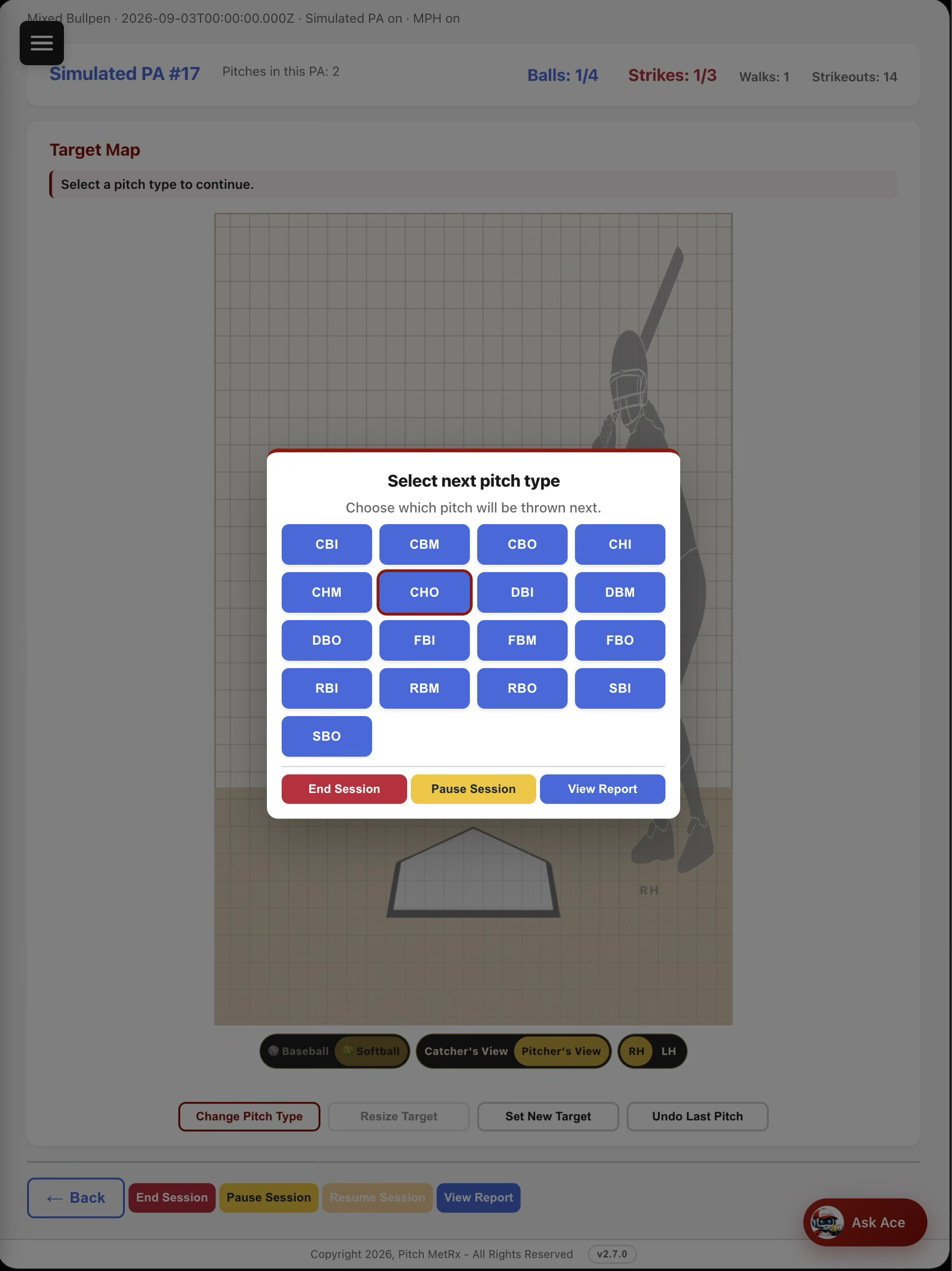
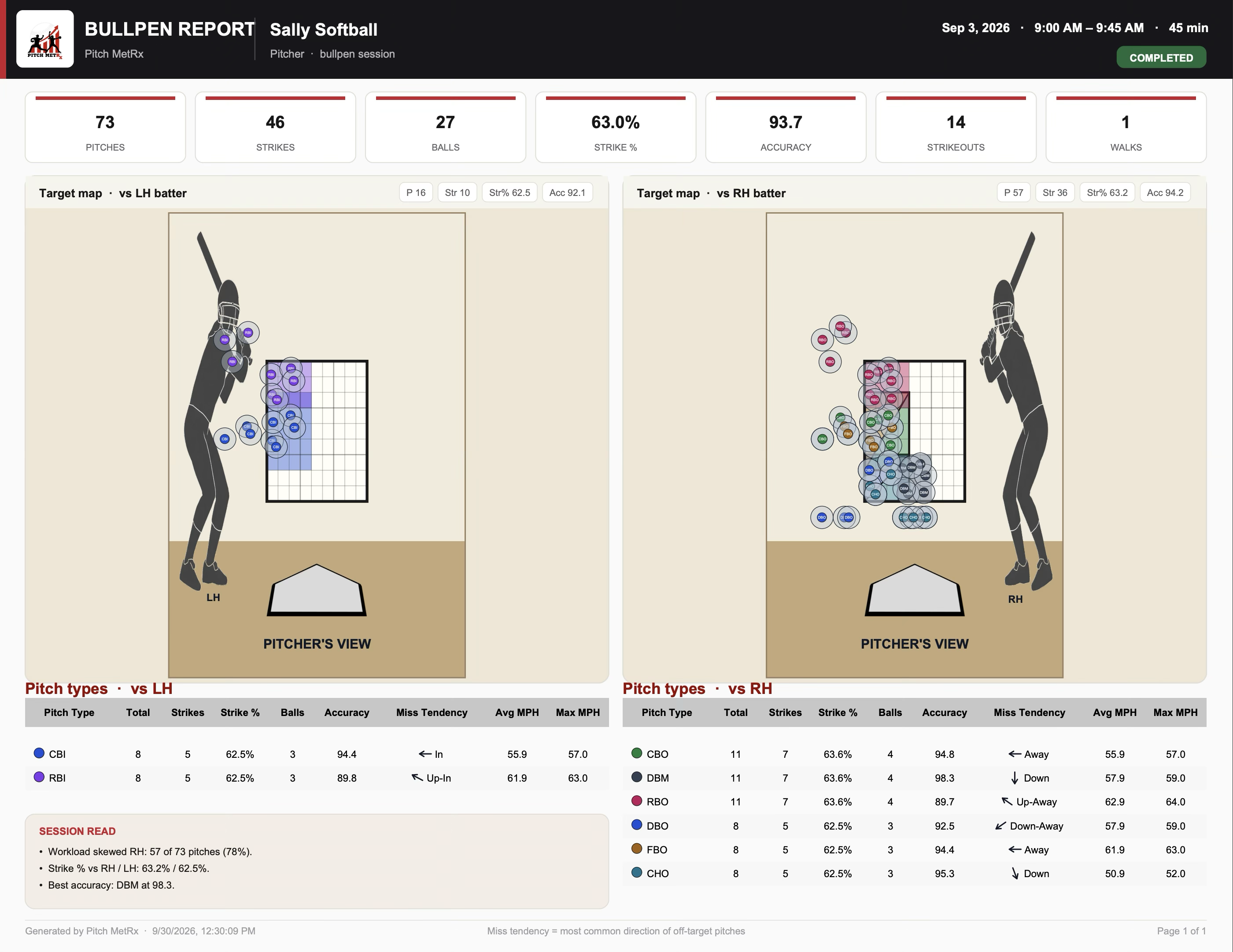
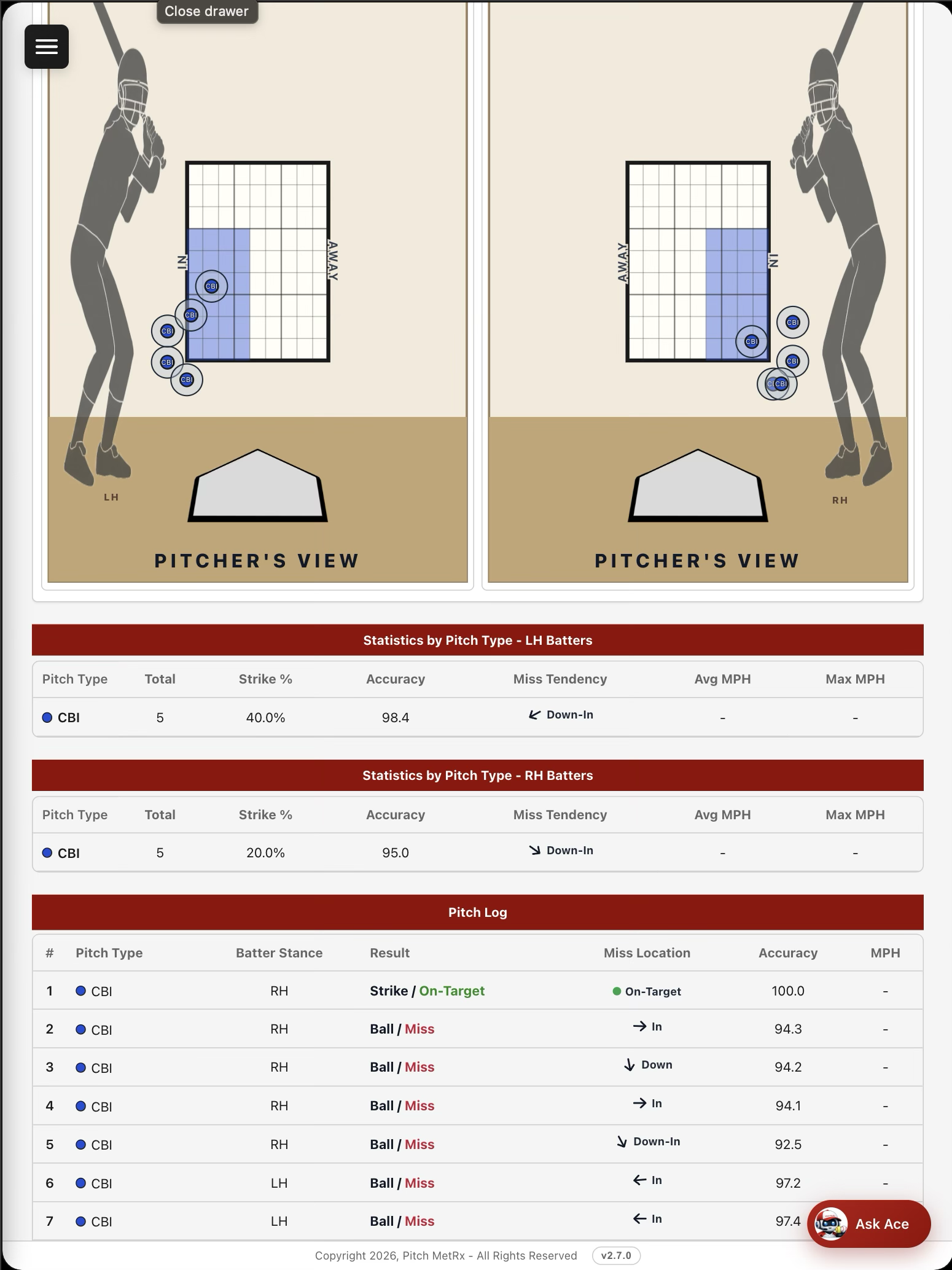
How a bullpen session works
- New Bullpen — pick the pitcher, date, and session name. Choose baseball or softball. Turn Log Pitch MPH on only if you will type velocity. Turn Simulated PA on only if you want plate appearances.
- Set the target — choose RH or LH and a pitch type. Drag a zone, resize it, or pick High / Mid / Low and In / Mid / Away. That target is remembered for that pitch and that stance.
- Log the pitch — tap where it crossed, including chase, then Confirm. Undo the last pitch if you tapped the wrong spot. Pause Session leaves the page and keeps the session active.
- End Session — finish the bullpen and open its report when there are pitches. The HTML pitch log shows each pitch’s miss location. The session map plots each pitch as a dot the size of the ball, with the pitch-type abbreviation on it.
- Lifetime or Custom — open Reports on the Bullpen page, or Bullpen Reports on the Reports page. Lifetime is every session for one pitcher. Custom filters by pitcher, date range or selected sessions, pitch type, and batter stance.
- Read the maps, then export — Target Maps — Summary is one map versus LH batters and one versus RH batters. Each pitch type keeps its own color. Darker color means more pitches of that type landed in that spot. Show on target maps (All, None, or one or more pitch types) is on the session report and on lifetime and custom reports. That filter changes the maps and the PDF maps. Statistics tables and the CSV still include every pitch type. Download or share PDF and CSV.
New accounts include sample bullpen sessions for Billy Baseball and Sally Softball, so you can open a lifetime report before the first live session. Two sessions per pitcher use Simulated PA: Billy’s Fastball Command and Mixed Bullpen, and Sally’s Riseball Command and Mixed Bullpen.
Frequently asked questions
What is Bullpen in Pitch MetRx?
Bullpen charts practice command. It is not a game. You name a session for one pitcher, draw or pick an intended target on the Target Map, then log where the pitch actually crossed. Reports show accuracy, strike percentage, and miss tendency.
How is a bullpen different from a live game?
A game logs competitive pitches, counts, and outcomes against a lineup. A bullpen logs practice command against a target you chose. Turn on Simulated PA if you want balls, strikes, walks, strikeouts, and K% between plate appearances. Leave it off for a command session.
What is miss tendency?
Miss Tendency names the average miss versus the target: Up, Up-Away, Away, Down-Away, Down, Down-In, In, Up-In, or On-Target. In and Away follow the batter. If the misses do not cluster, the report says Mixed. Reports use Pitcher’s View.
What is the difference between accuracy and strike percentage?
Accuracy scores the pitch against the target you drew. It is 100 when any part of the ball touches that target, and it reaches 0 at one strike-zone width (17 inches) away. Strike percentage is different: a pitch is a strike when any part of the ball touches the strike zone, even if it missed the target.
Can I log pitch velocity in a bullpen?
Yes, if you turn on Log Pitch MPH when you start the session. You type the speed by hand and you can skip a pitch. Pitch MetRx does not measure speed or spin. When MPH was logged, session, lifetime, and custom reports include Avg MPH and Max MPH.
Do I need a separate subscription for Bullpen?
No. Bullpen is included with the 14-day free trial and with every Pitch MetRx subscription. Open it from the sidebar, the Dashboard, or a pitcher’s page. No radar, camera, or other hardware is required. Start a 14-day free trial.
Turn the next bullpen into a target, not a guess
Chart command for baseball and softball on the phone, tablet, or laptop you already bring to the pen. Included with every Pitch MetRx subscription.
Start 14-Day Free Trial