
Opposing Rosters
Save Opponent Batters Once. Reuse Them Every Game.
Stop retyping the same hitters. Opposing Rosters in Pitch MetRx store each opponent’s batter list—name, jersey, and LH/RH stance—so game-day setup is a dropdown, live scoring shows named batters, and scouting reports can attack the actual lineup you will face.
Roster vs. lineup—what coaches actually save
A roster is the saved player list for an opponent team. A lineup is today’s batting order in a live game (Lead-Off, 3-Spot, 9-Spot). Build the roster once; attach it when you start or schedule a game. If you do not have the order yet, fill a new lineup during the game and Pitch MetRx can add new players to the existing roster after you confirm.
Reusable opponent lists
Create a roster with batter name, optional jersey (0–99), and stance (RH, LH, or blank). Default nine rows; add up to 20 batters.
One-select game setup
On New Game or Schedule a Game, pick {Team} - Roster instead of sequential Batter #. Named hitters are ready before first pitch.
Cumulative batter stats
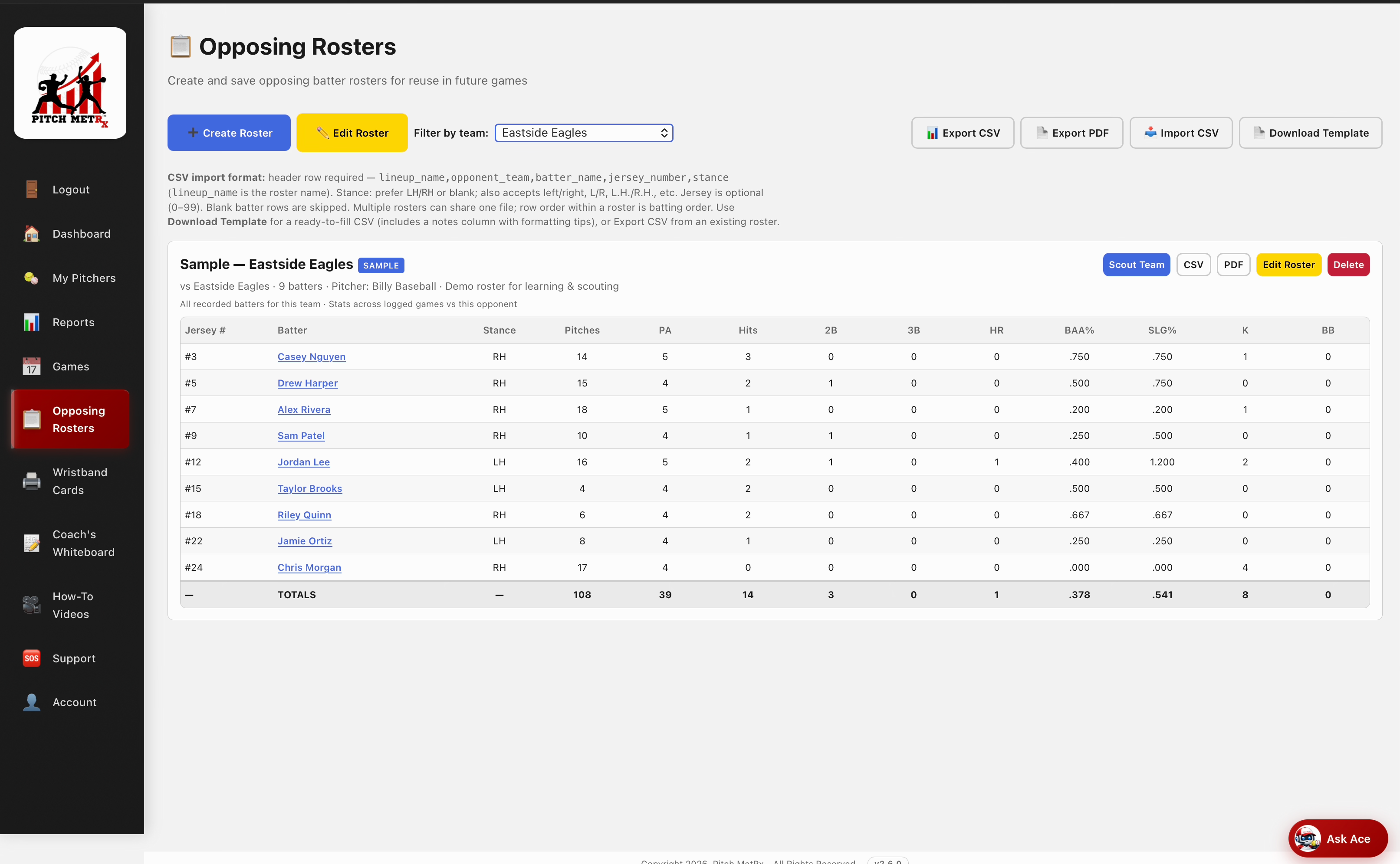
Each roster card shows recorded batters for that opponent with pitches, PA, hits, BAA, SLG%, K, and BB across logged games vs that team.
CSV & PDF
Export a roster or the full list. Import CSV after a confirmable preview. Download the template so Excel columns (name, jersey, stance) import cleanly.
Scout from the roster
Tap Scout Team on a roster card—or Scout on a batter while editing—to generate an AI attack plan from that pitcher’s history.
Sample rosters included
New accounts get labeled Sample rosters (Eastside Eagles / Valley Vipers) plus demo games scored with named batters so you can practice before your first real opponent.
How opposing rosters work
- Open Opposing Rosters from the sidebar after you sign in (subscription or free trial required).
- Create Roster — enter roster name and opponent team, then add batters (name, jersey, stance).
- Save once — the list is reusable. Edits later do not rewrite past game snapshots.
- Attach at game time — select the team roster on New Game Setup or Schedule a Game.
- Add new hitters live — if a player is not on the saved roster, confirm to update that roster. Pitch MetRx does not create a second copy.
- Export or scout — CSV/PDF for staff, or Scout Team for a pre-game attack plan.
Why named-batter history changes pitch calling
Sequential Batter # still works when you need to chart fast. Named rosters change what you can do after the game: filter reports by individual hitter, split LH vs RH with real names attached, and feed AI scouting reports with the same pitch log you built in the dugout.
Frequent opponents
League and conference teams you see twice a season. Build the roster once; game day is a dropdown.
Showcase & travel
Import a CSV before the weekend. Jersey numbers distinguish shared names when you scout later.
Staff handoff
PDF and CSV exports share the opponent list with assistants who are not in the dugout with the tablet.
Baseball & softball
Same roster workflow for both sports. Stance (LH/RH) drives matchup filters in reports and scouting.
Frequently asked questions
What is an opposing roster in Pitch MetRx?
An opposing roster is the saved player list for an opponent team—batter name, optional jersey number, and LH/RH stance. You reuse it whenever you face that team. A lineup is today’s batting order in a live game.
How is a roster different from a lineup?
A roster is the reusable opponent player list. A lineup is the batting order for today’s game (Lead-Off, 3-Spot, 9-Spot, and so on). Attach a roster at game setup, or fill a new lineup during the game without a roster.
Can I import and export opposing rosters?
Yes. Export a roster to CSV or PDF from the Opposing Rosters page. Import CSV creates new rosters after you confirm a preview—nothing is saved until you confirm. Download the template first for the correct columns.
Do I need a separate subscription for Opposing Rosters?
No. Opposing Rosters are included with every Pitch MetRx subscription and the 14-day free trial. The page appears in the sidebar after you sign in. Start a free trial to try sample rosters immediately.
What happens if I delete a saved roster?
Deleting a roster removes the reusable template only. Games that already used it keep their in-game snapshot and pitch history. Past named-batter logs are not erased.
Build your first opposing roster today
Join programs at UCLA, Williams College, Capistrano Valley, and travel ball nationwide who use Pitch MetRx for data-driven pitch calling.
Start 14-Day Free Trial